Can you make an AI influencer on your phone?
You can run an AI influencer from your phone, but you build her once on a laptop. Her first faces (10 a day, free, in our Discord generator) and every daily task work on the phone; the one-off build, a 50-image dataset and a character LoRA, is about 3 to 6 hours of machine time that’s far easier on a bigger screen. Then a private Telegram bot sends her photos to your phone. The full build is in how to create an AI influencer.
What works on a phone, and what needs a computer?
The face and everything daily works on a phone. The build in the middle needs a laptop once: deploying pods, uploading a dataset, setting up a training job and downloading her LoRA. None of it runs on your own hardware, so any normal laptop with a browser does. Once she exists, the laptop mostly stays shut.
| Step | Phone | Laptop | Why |
|---|---|---|---|
| Her first faces | Yes | Optional | The free Discord generator runs in the Discord app |
| 50-image dataset | No | Yes, once | A ComfyUI workflow on a rented pod, 30 minutes to 2 hours with the tab open |
| Character LoRA training | No | Yes, once | Upload a zip, set up a job in AI Toolkit, download files 2 to 3 hours later |
| Telegram bot setup | No | Yes, once | You paste code into a Cloudflare Worker and fill in 5 values |
| Daily photos | Yes | No | Text the bot a scene |
| Posting and stories | Yes | No | The course posts from the phone only |
| Videos | No | Yes, in batches | A video tool or a GPU session, then post from the phone |
Why build her on a laptop?
Because every build step is a desktop-style web app. You deploy a pod on RunPod, work in ComfyUI’s node graph, move files in JupyterLab and set up a training job, over several hours. A phone browser can open these pages, but you’d be pinching and zooming through a workflow built for a big screen. You do it once.
The build is the four free videos, in order:
- Video 1: her face. A template on a rented RTX 4090, or the free Discord generator on your phone.
- Video 2: one face into 50 images. The Dataset Maker, 30 minutes to 2 hours. Video 2 says keep the browser tab open until it finishes.
- Video 3: train her LoRA. About 2 to 3 hours on an RTX PRO 6000. You can close the tab and come back.
- Video 4: her Telegram bot. A one-off setup. After this the phone takes over.
The costs, step by step, are in AI influencer startup costs.
Can you make her face on your phone for free?
Yes. The free AI Empire Discord generator makes 10 images a day, one limit for everyone, and it works in the Discord app on your phone. Each image takes about 30 seconds. Use it to find her face before you spend anything: generate, compare, keep the one you want to build on.
- Join the AI Empire Skool free from the free course page.
- Open Phase 2, lesson “Discord Generator”, and copy the access code. It changes every week.
- In the Discord, go to the
#unlockchannel, press Verify and enter the code. - In the face generator channel, type
/faceand paste a prompt.
The course’s ChatGPT prompt helper writes the prompts: it asks three questions about her look and returns three prompts at a time. Or use our free prompt generator in your phone’s browser.
These are faces, not a character yet. Each new prompt can give you a different woman. Holding one face across hundreds of photos is what the LoRA is for.
How do you make her photos from your phone?
With the private Telegram bot from video 4. You text it a scene, and a serverless endpoint on RunPod draws her with her LoRA and sends the photo back to the chat. It costs about 1 cent for every 3 photos and $0 while idle (owner’s figures, October 2026). Only your Telegram ID can use it.
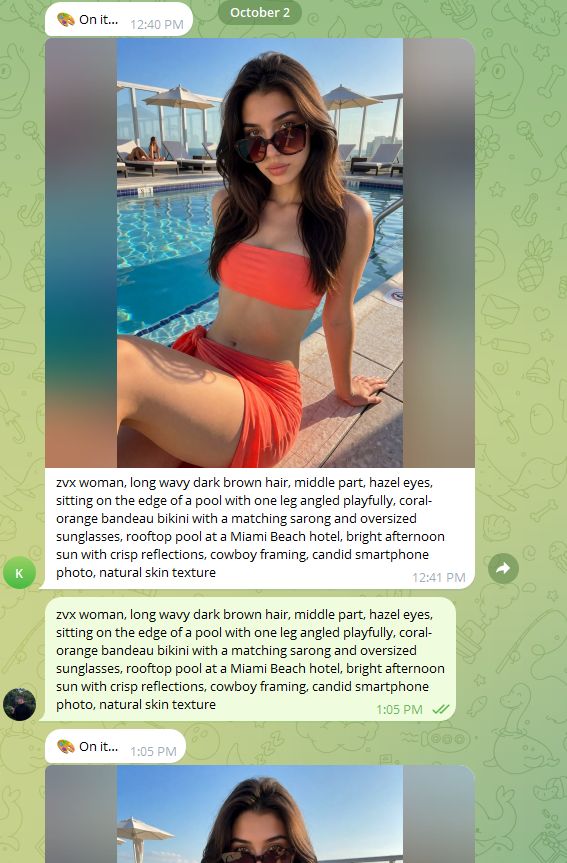
- Speed. The first photo after a break takes longer while the GPU wakes up. After that, about 20 seconds a photo.
- Running costs. The Cloudflare Worker that connects it runs on Cloudflare’s free plan, which allows 100,000 requests a day (Cloudflare limits, checked 4 October 2026).
- Privacy. The bot only makes photos for the Telegram IDs in its
OWNER_IDsetting.
Write prompts the same way you would anywhere: her trigger word, one short hair-and-eyes line, then the scene. Swap in your own trigger word and hair line:
zvx woman, long wavy dark brown hair, middle part, hazel eyes, walking along a city sidewalk holding an iced coffee, oversized grey hoodie and black bike shorts with white sneakers, quiet street with parked cars and shops, soft overcast morning light, full body shot from the front, candid smartphone photo, natural skin textureNever describe her face shape, makeup, skin or body: the LoRA already knows her. The photos land in your Telegram chat, so saving one to your camera roll and posting it is a few taps.
Why does the course post from the phone?
Because a new account should look like what it is: a person posting by hand from an app. The course rule is to create her Instagram on the phone, post from the phone only, and scroll naturally for 10 to 20 minutes a day. Bots, automation and browser extensions that like, follow or reply break Meta’s terms.
The phone is also where the labels live. On Instagram you switch on the AI-generated profile label in Edit profile before her first post. On TikTok you turn on the AI-generated content setting on each post before you tap Post (how to add TikTok’s AI label).
The daily rhythm (10 to 20 minutes of natural scrolling, a reel and a carousel every 2 days, daily stories, a link story every 3 days from day 8) is all posted from the phone. The free posting schedule planner turns it into a calendar from your start date.
The full first week is in how to warm up a new Instagram account.
What about AI influencer apps?
Some apps make a character on the phone from start to finish. Before you pay for one, check what you’d own when you stop paying, and what it asks you to upload. Some advertise remaking any TikTok or Instagram video with your character, which means using someone else’s clip and, often, their likeness. We don’t use those features.
Five questions for any app:
- Can you export her? A LoRA file you keep, or only images inside the app?
- Does her face hold across hundreds of photos, not just the demo?
- What does one image or one second of video cost in credits, including the ones you throw away?
- What does it want you to upload? Never other people’s photos or clips. Use her own earlier images, licensed stock, or a clip you filmed of your own movement.
- What do its terms say about commercial use of what you make?
Whatever app you use, the platform labels are still your job. How an app compares with owning a LoRA is in the best AI influencer generator, and what we use at each step is in the AI influencer tools we use.
What can go wrong?
- You try the whole build on the phone. The dataset and training pages work in a phone browser, but it’s slow and easy to mis-tap. One laptop session saves hours.
- The phone locks during the dataset run. Video 2 says keep the tab open until it finishes. Run it on the laptop.
- You leave a pod running after the build. A pod bills until you terminate it, phone or not. Stop and terminate before you close the laptop.
- The bot says nothing for a minute. Normal after a break: the GPU is waking up. The next photos take about 20 seconds.
- The bot draws someone else. Start the prompt with exactly the trigger word you trained with.
- You let a bot or extension like and follow for her. Automation breaks Meta’s terms. Do it by hand from the phone.
- You use an app’s “remake any video” feature. That’s someone else’s clip and often their face. Use your own clips or licensed ones.
Questions people ask
Can I train a LoRA on my phone?
Is there a free AI influencer app for phones?
Do I need an iPhone or Android for this?
Can I generate her photos on my phone without the Telegram bot?
Read next
- How to create an AI influencer in 2026, step by step
One original face, a 50-image dataset, a character LoRA you own, the AI label on, then growth and Fanvue. Real steps, settings and GPU costs.
- How to warm up a new Instagram account, the honest way
An honest 7-day warm-up for one new Instagram account: profile, scrolling, first posts from your phone, link on day 8. No proxies, no bought accounts.
- The AI influencer tools we use at every step, free and paid
The AI influencer tools we use at each step, free and paid: face, dataset, LoRA, daily photos, video and UGC. Real costs, dated October 2026.
- Which AI influencer generator should you use?
Higgsfield, OpenArt, RYLA and ZenCreator compared on their own pricing and terms (4 Oct 2026), and why we build our character as a LoRA file instead.