The AI influencer tools we use at every step, free and paid
There’s no single best AI tool for an AI influencer: you need about 6, one for each step. We use a free face generator, a dataset maker, AI Toolkit for her LoRA, a generator or a Telegram bot for daily photos, and Kling, Wan 2.2 or LTX for video. Most steps have a free option; the paid ones cost cents to a few dollars (October 2026). The full build is in how to create an AI influencer.
Affiliate note: RunPod and Fanvue links on this page are referral links. If you sign up through them, AI Empire may earn credits or a commission. You pay the same. How this works.
On this page
- Is there one best AI tool for an AI influencer?
- Which tools do we use at each step?
- How do you make her face for free?
- Which tool builds her dataset?
- What do you train her LoRA with?
- What do you use for daily photos?
- Which AI video tool should you use?
- What about AI UGC and selling?
- Why own a LoRA instead of renting an app?
- What can go wrong?
Is there one best AI tool for an AI influencer?
No. An AI influencer is a pipeline: a face, a dataset, a LoRA, daily photos, video, selling. Different tools win different steps. When we searched “best AI tool for AI influencer” on 2 Oct 2026, several of the top lists were published by a tool on their own list. So here’s what we use at each step, free and paid.
We don’t crown a “best model” either. Models change every few months, and what works depends on your character and your GPU budget. Test before you commit. If you’re weighing an all-in-one app instead, see which AI influencer generator to use.
Which tools do we use at each step?
Six steps, two options each. The free column costs nothing but your time, or only rented GPU time where noted. The paid column is what we pay for when speed or quality matters. Prices are RunPod’s and the vendors’ as of 2 October 2026; they change often, so check them before you plan a budget.
| Step | Free option | Paid option |
|---|---|---|
| 1. Her face | Discord face generator: 10 images a day, Z-Image Turbo, about 30 s each | Our face workflow on a rented RTX 4090 (about $0.74/hr secure, $0.34 community): about 5 s an image |
| 2. Angles and edits | An open-weight edit model such as Qwen-Image-Edit on your own pod, GPU time only (not what the course uses) | Nano Banana Pro Edit via RunPod: $0.14 an image at 1K/2K. The course runs its angle prompts in Nano Banana Pro |
| 3. Dataset, 50 images | Dataset Maker’s free engine on a 24 GB+ GPU: an estimated $2-5 of GPU time | Dataset Maker with Nano Banana Pro (about $7) or Seedream (about $1.50), on any cheap GPU |
| 4. Her LoRA | AI Toolkit costs nothing; the GPU doesn’t | RTX PRO 6000 at $2.09/hr (secure cloud), 2 to 3 hours. 32-48 GB cards give a worse LoRA |
| 5. Daily photos | Telegram bot: Cloudflare Workers free plan + RunPod serverless, $0 while idle | Generator workflow on a rented pod, by the hour |
| 6. Video | Wan 2.2 (open-weight) or LTX on a rented GPU (GPU time only) | Kling: paid credits, about 9-12 credits per second for 3.0 motion control |
Writing prompts is free at every step: our AI influencer prompt generator builds them in the course format, and the course’s ChatGPT prompt helper asks you about her look (hair, eyes, age, vibe and more) and returns three prompts at a time.
How do you make her face for free?
In the free AI Empire Discord face generator: 10 images a day, one limit for everyone, about 30 seconds each, running on Z-Image Turbo. When you need more, run the same kind of workflow on your own rented GPU: about 5 seconds an image on an RTX 4090, a few cents per session.
To get access, join the Skool for free, open the Phase 2 lesson “Discord Generator” for the access code, verify in the Discord’s #unlock channel, then type /face and your prompt in the generator channel. The exact settings for running it yourself are in Z-Image Turbo settings.
Which tool builds her dataset?
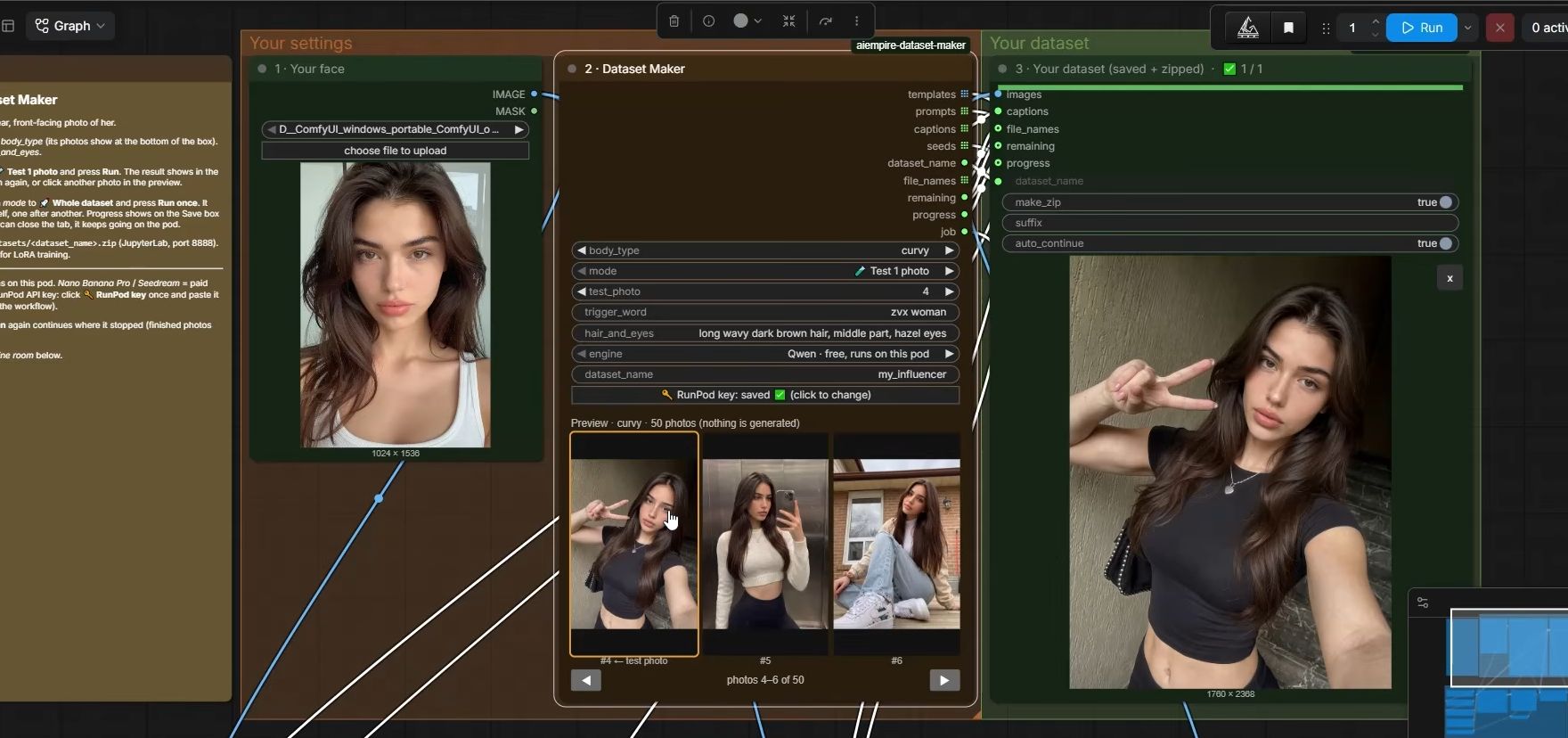
Our Dataset Maker, a public repo that runs in ComfyUI on a rented pod. You give it one clear front-facing photo of her, and it makes 50 images of her with a caption file for each, zipped. It has three engines: one free on the pod’s GPU, and two paid through RunPod’s API.
| Engine | Cost (Oct 2026) | GPU it needs | Notes from our setup |
|---|---|---|---|
| Free engine (Qwen-Image based) | GPU time only: an estimated $1.90 per dataset on an RTX 5090 (secure cloud) | 24 GB minimum, 48 GB+ ideal | Slow on 24 GB cards |
| Nano Banana Pro | about $0.14 a photo | Any cheap GPU, such as an RTX A4000 | Made bodies bigger easily, wouldn’t shrink them from text |
| Seedream | about $0.03 a photo | Any cheap GPU | We used it for the petite body preset |
The dataset times and per-dataset costs are the owner’s estimates, not measurements. Refused photos are skipped and retried once at the end. More on the two paid engines in Nano Banana Pro vs Seedream, and on dataset size in how many images a LoRA needs.
What do you train her LoRA with?
AI Toolkit by Ostris, on a rented RTX PRO 6000 (96 GB). Our template runs the official image with a few helpers and needs no Hugging Face account: you upload her dataset in AI Toolkit’s New Dataset screen and set up the job yourself. Cards with 32 to 48 GB need quantization and Low VRAM, which gives a worse LoRA.
The course trains on Krea 2 as the base model and makes photos with Krea 2 Turbo. Results depend on the base model, so test before you commit. Training takes 2 to 3 hours, at $2.09 an hour on secure cloud (2 Oct 2026). The trainer itself is on GitHub. Here’s how AI Toolkit compares with OneTrainer and Kohya.
What do you use for daily photos?
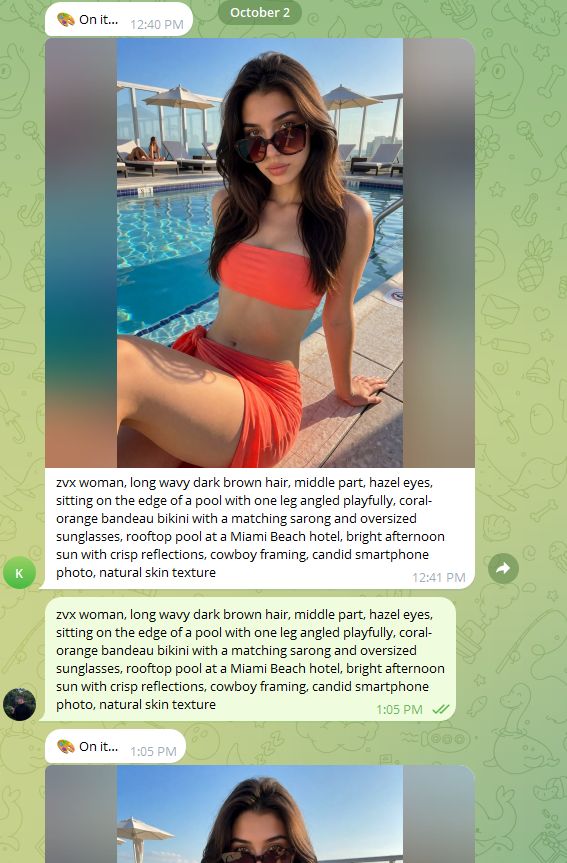
Two ways. A generator workflow in ComfyUI on a rented pod, for batch sessions. Or a private Telegram bot: text it a scene, and her photo arrives in the chat. The bot runs on a Cloudflare Worker and a RunPod serverless endpoint, so it costs nothing while idle and only bills per second while a photo generates.
- Generator workflow (our current template): her LoRA at 0.9, 8 steps, CFG 1, 1024×1536.
- Telegram bot: Cloudflare’s free Workers plan allows 100,000 requests a day (Cloudflare limits). RunPod serverless scales to zero when idle (RunPod pricing). A photo takes about 20 seconds and costs about 1 cent per 3 photos (the owner’s figures, October 2026); the first one after a break takes longer while the GPU wakes. It runs Krea 2 Turbo, so it needs a LoRA trained on Krea 2.
Which AI video tool should you use?
It depends what you trade. The course’s line: Kling is the fastest of the three and the one we reach for when quality matters most, but it’s rented and paid. Wan 2.2 is an open-weight model you run on a rented GPU. LTX makes cheap batches at lower quality. We use each for a different job, not one for everything.
| Tool | How you pay | What it’s good for | Numbers we have (Oct 2026) |
|---|---|---|---|
| Kling | Paid credits | Fastest; the course’s pick when quality matters most; motion control | 3.0 motion control: 9 credits/s Standard, 12 Professional (Kling guide) |
| Wan 2.2 | Rented GPU by the hour | Open-weight; you can train a video LoRA | Generation on an RTX 5090, about $0.99/hr secure |
| LTX | Rented GPU by the hour | Cheap batches, lower quality | Pod load 20-40 min, first video about 10 min, then ~20 clips per session |
The full comparison is in AI influencer videos.
What about AI UGC and selling?
For AI UGC, the course’s lesson generated clips with Higgsfield running Kling and put them together in CapCut: clips of up to 8 seconds, about 24 seconds in total. For selling, the course points to Fanvue, which allows disclosed AI creators and keeps a 20% platform fee, per its creator earnings terms (checked 2 Oct 2026).
The step-by-step UGC flow is in how to make AI UGC videos. Fanvue’s rules, fees and settings are in Fanvue for AI creators.
Why own a LoRA instead of renting an app?
Because her face is the asset everything else runs on. An all-in-one app charges monthly or per credit, and the character usually lives inside that service. A character LoRA is a file you keep: it loads into ComfyUI, a template or your own bot, with the base model it was trained for, for as long as you post her.
That’s the course’s whole approach: open-weight models you run yourself, on GPUs rented on RunPod by the hour. No expensive PC. Paid services like Nano Banana Pro and Kling still have a place, as tools for one step, not as the home of your character. Whatever you use, check each model’s licence and terms before you sell what it makes. GPU choices and the stop vs terminate trap are in our RunPod guide.
What can go wrong?
- You build her inside a subscription app. Months later you want to leave, and her face stays behind. Keep a LoRA of your own.
- The bill keeps running after you’re done. A stopped pod still bills its volume disk, at $0.20 per GB per month (RunPod, Oct 2026). Terminate it.
- You picked a 16 GB card for the free dataset engine. It needs 24 GB at least. Under 24 GB, use only the paid engines.
- The paid engine refuses some photos. The Dataset Maker skips them and retries once at the end. Check the count before you train.
- Video credits go faster than you think. At 12 credits a second, one 10-second Kling 3.0 motion control clip on Professional is 120 credits. Test short clips first.
- You trusted a “best tool” list. Check who published it. Then test the tool on your own character before you pay for a year.
Questions people ask
What is the best AI tool to create an AI influencer?
Can I make an AI influencer with free tools only?
Do I need a paid AI influencer app?
How much does the whole setup cost?
Read next
- How to create an AI influencer in 2026, step by step
One original face, a 50-image dataset, a character LoRA you own, the AI label on, then growth and Fanvue. Real steps, settings and GPU costs.
- RunPod for AI images: templates, GPUs and what it costs
Rent a GPU by the hour instead of buying one. Which RunPod GPU to pick, what storage costs, how to run ComfyUI, and the stop vs terminate trap.
- How do you make AI influencer videos?
Three ways to animate an original AI character: Kling (rented, fast), Wan 2.2 (open-weight on RunPod) or LTX (cheap batches). What each needs and costs.
- Nano Banana Pro vs Seedream: two dataset engines, real costs
We run both as paid engines in our Dataset Maker: $0.14 vs about $0.03 a photo, which versions you actually get, and the job only Seedream would do.