Nano Banana Pro vs Seedream: two dataset engines, real costs
In the AI Empire Dataset Maker, Nano Banana Pro costs about $0.14 a photo and Seedream about $0.03, so a 50-photo dataset runs about $7 or about $1.50 in API fees. Neither is simply better: Nano Banana Pro made most of our body presets, and Seedream did the one job Nano Banana Pro wouldn’t. Both are paid engines for the dataset step of keeping an AI character consistent: one face in, 50 captioned training images out.
Affiliate note: RunPod and Fanvue links on this page are referral links. If you sign up through them, AI Empire may earn credits or a commission. You pay the same. How this works.
What are Nano Banana Pro and Seedream?
Two image-editing models from two companies, both reachable through RunPod’s public API. Nano Banana Pro is Google’s Gemini 3 Pro Image. Seedream is ByteDance’s model family. In the Dataset Maker each one takes your character’s face and a template photo, and returns that photo with her in it.
| Nano Banana Pro | Seedream | |
|---|---|---|
| Made by | Google (Gemini 3 Pro Image) | ByteDance Seed |
| Released | 20 Nov 2025 | 4.0: 9 Sep 2025; newer since: 4.5, 5.0 Lite (13 Feb 2026), 5.0 Pro (8 Jul 2026) |
| Version the Dataset Maker calls | Nano Banana Pro Edit | Seedream 4.0 Edit |
| Reference images | Up to 14; resemblance of up to 5 people | Up to about a dozen (ByteDance, for 4.0) |
| Price on RunPod | $0.14 (1K or 2K), $0.24 (4K) | $0.027 per image |
Sources, checked 2 Oct 2026: Google’s Nano Banana Pro announcement, ByteDance’s Seedream 4.0 release, ByteDance’s Seedream 5.0 Lite post, ByteDance’s Seedream 5.0 Pro post, RunPod’s public endpoint prices.
The version line matters. Most “Nano Banana Pro vs Seedream” reviews test Seedream 4.5 or 5.0 on posters and product shots. Through this engine you get Seedream 4.0 Edit, doing one specific job: putting one face into 50 photos. Results from those reviews don’t transfer one to one.
How much does each engine cost for a full dataset?
About $7 for 50 photos with Nano Banana Pro and about $1.35 to $1.50 with Seedream, in API fees. Both are billed per photo by RunPod, not by GPU time. The free Qwen-based engine has no per-photo fee but runs on your pod’s GPU, so you pay for a bigger card for longer instead.
| Engine | Price per photo | 50-photo dataset | GPU you need |
|---|---|---|---|
| Nano Banana Pro (2K, what the Dataset Maker requests) | $0.14 | about $7.00 | The cheapest one: the API does the work |
| Seedream 4.0 Edit (long side 2048 px) | $0.027 | about $1.35 (we round to ~$1.50) | The cheapest one |
| Qwen-based engine, free | $0 | GPU time only, about $2-5 on a good GPU (our estimate) | 24 GB VRAM minimum, ideally 48 GB+ |
API prices: RunPod public endpoints, checked 2 Oct 2026. GPU: secure cloud, October 2026.
The paid engines never touch the pod’s GPU, so pick the cheapest card available, for example an RTX A4000 at about $0.25 an hour (October 2026). The VRAM guidance in our RunPod guide only matters for the free engine. Two things keep the bill down: “Test 1 photo” costs one photo, and re-running a dataset skips photos that are already finished, so you never pay twice for the same image.
RunPod also lists Nano Banana 2 Edit at $0.0875 to $0.175 an image. The Dataset Maker’s engine menu offers two paid engines, Nano Banana Pro and Seedream, plus the free Qwen-based one (as of October 2026).
What did we find when we used both?
The biggest difference showed up when we made the Dataset Maker’s body presets: six body types, 50 fully AI-generated template photos each, made by editing one base set into the others. Nano Banana Pro made bodies bigger easily, but would not make them smaller from text alone. Seedream would, so Seedream made the petite preset.
Three more things we learned along the way:
- Short prompts for smaller edits. A long “keep everything else exactly the same” prompt made the edit do almost nothing. A short, direct instruction worked.
- Image order mattered for Nano Banana Pro in our runs. It tended to hand back the last image it was given: with the photo to edit sent first, it sometimes returned the face photo unchanged. Reference first, photo to edit last worked for every preset photo. The Dataset Maker sends her face first and the template photo second.
- The other engine is the fallback. When Nano Banana Pro gave up on a few photos, we re-ran only those on Seedream instead of redoing the set.
What we haven’t published is a side-by-side of face likeness across 50 photos. That depends on your character’s face, so test it yourself: one photo on each engine costs about $0.17 in total.
Which engine should you use for your dataset?
Pick by job, not by reputation. Seedream is the budget pick and the one that will make a body smaller. Nano Banana Pro is what made most of our presets. The free engine is for when you’d rather pay for GPU time than per photo. Whatever you pick, run one test photo of your own face first.
| Your situation | Engine to try first | Why |
|---|---|---|
| First dataset, tight budget | Seedream | About $1.50 for 50 photos |
| Petite or smaller build | Seedream | Nano Banana Pro wouldn’t shrink a body from text |
| Most other body presets | Nano Banana Pro | It made most of our presets |
| A few photos failed or look off | The other engine | Re-run just those photos |
| No API key, or you already rent a 48 GB GPU | Qwen-based free engine | No per-photo fee |
After the dataset, everything is the same whichever engine you used: the captions come from the preset, the character LoRA trains on the 50 images, and her face comes from her trigger word. How many images you need and how the captions work are in our LoRA dataset guide.
How do you switch engines in the Dataset Maker?
One dropdown and one key. In the Dataset Maker box, set engine to Nano Banana Pro or Seedream, click the RunPod key button once and paste an API key from your RunPod account. The key is saved on the pod, not in the workflow, so sharing the workflow file never shares your key.
- Get an API key in your RunPod account under Settings, API Keys.
- Deploy the Dataset Maker pod on the cheapest GPU, since the paid engines don’t use it. Set
JUPYTER_PASSWORD. - Upload her face in “Your face”: one clear, front-facing image of your original AI character.
- In the Dataset Maker box, pick body_type, fill trigger_word (default
zvx woman) and hair_and_eyes, and set engine. - Click “RunPod key” and paste the key. It’s saved at
/workspace/.runpod_key. - Run “Test 1 photo”, check the result, then switch mode to “Whole dataset” and press Run once.
- Download
output/datasets/<name>.zipfrom JupyterLab on port 8888.
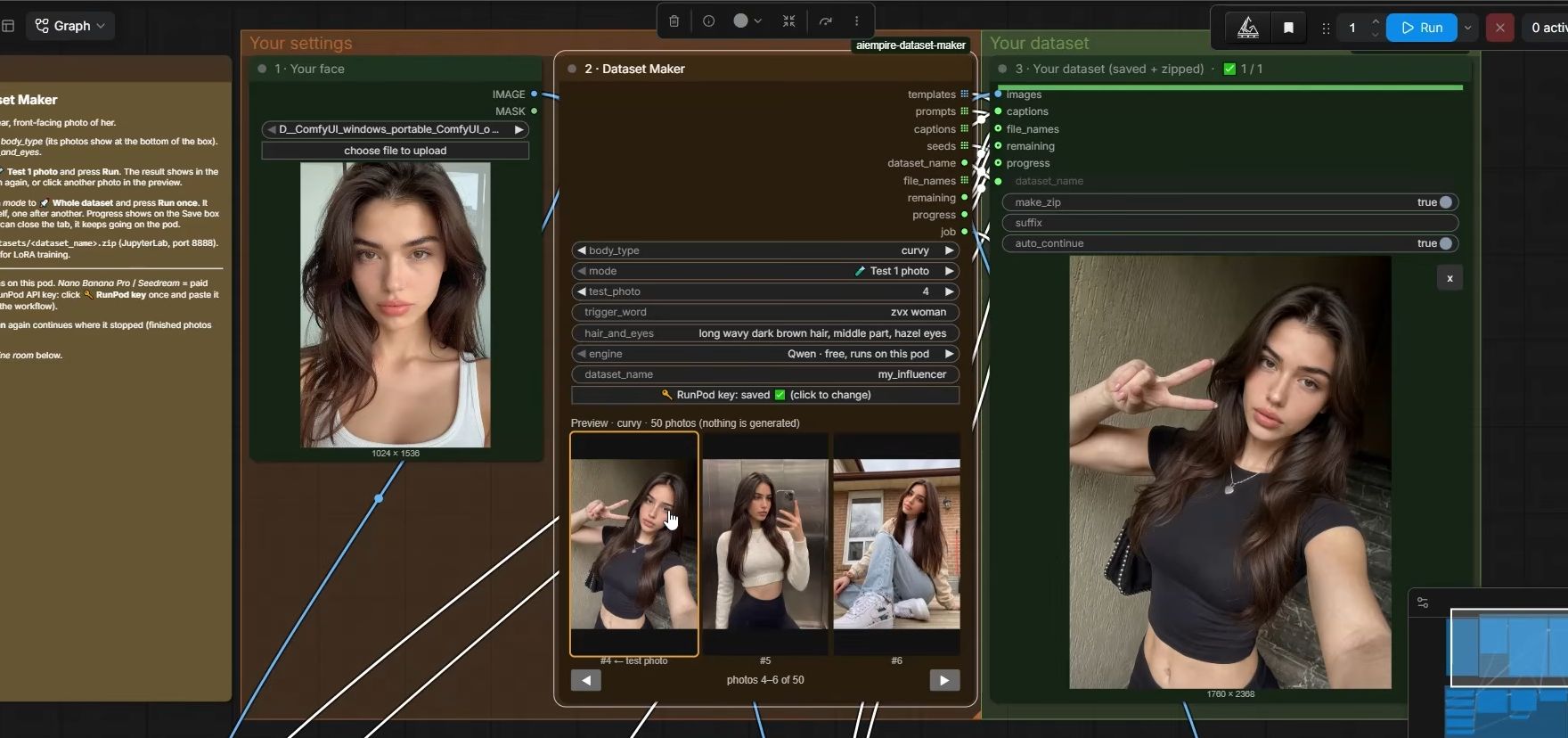
One trap: every RunPod pod has its own RUNPOD_API_KEY variable, and we found that this pod-scoped key can’t call the public endpoints. The Dataset Maker ignores it on purpose. Use a key from your account settings.
What happens when an engine refuses a photo?
The run keeps going. Each photo gets up to three tries, and a job stuck in RunPod’s queue for more than 4 minutes is cancelled and tried again. Photos that still fail are skipped and retried once at the end, so one refusal never stops a 50-photo run halfway.
RunPod’s Nano Banana Pro endpoint has a safety checker that’s on by default (endpoint docs, checked 2 Oct 2026). Both engines are only for your own AI character’s images: never a real person’s face, never photos taken from social media. If a few photos still fail after the retry, run just those on the other engine.
What can go wrong?
- “RunPod says the API key is wrong.” You pasted the pod’s own key or a typo. Make a key in account settings and paste it again with the RunPod key button.
- The output is just her face photo. In our runs, that happened when the photo to edit was sent first. The Dataset Maker sends face first; if you write your own calls, do the same.
- The petite preset barely changes. Nano Banana Pro won’t shrink a body from text. Use Seedream, with a short instruction.
- Your results don’t match a review you read. The review tested Seedream 4.5 or 5.0. This engine calls Seedream 4.0 Edit.
- You paid for a 96 GB GPU to run an API engine. The paid engines don’t use it. Stop, terminate, and redeploy on the cheapest card.
- The bill is higher than $0.14 a photo. Nano Banana Pro costs $0.24 at 4K. The Dataset Maker requests 2K; keep it there unless you change the code.
- Her face drifts in a few photos. Delete them before training. One off image teaches the LoRA a second face, whichever engine made it.
Questions people ask
Is Nano Banana Pro better than Seedream?
How much does a 50-image LoRA dataset cost with each engine?
Which Seedream version does the Dataset Maker use?
Do I need a Google or ByteDance account?
Can I use a real person's photo as the face?
Read next
- How many images do you need to train a character LoRA?
A character LoRA needs 20 to 50 images. We train on 50. What they should show, how to caption them, how to pick a trigger word, and what goes wrong.
- How to keep your AI character's face the same in every photo
Prompts, reference images, a character LoRA, or a LoRA trained on a dataset you generate. What each holds, what it costs, and when you need a LoRA.
- RunPod for AI images: templates, GPUs and what it costs
Rent a GPU by the hour instead of buying one. Which RunPod GPU to pick, what storage costs, how to run ComfyUI, and the stop vs terminate trap.