LoRA not working? 7 checks, cheapest first
When a character LoRA isn’t working, run 7 checks, cheapest first: the file loaded, the base model matches, the trigger word is exact, the strength is high enough, the generation settings match, the checkpoint is right, and the dataset covers the shot. The first four take minutes, and none of them needs a retrain. Once she shows up reliably, the rest of the consistent AI character setup is prompting.
On this page
- Why is my LoRA not working?
- How do you know the LoRA actually loaded?
- Does the LoRA match the base model?
- Is the trigger word exactly right?
- Is the LoRA strength high enough?
- Why do trainer samples look fine but ComfyUI images look worse?
- What if she looks right in close-ups but not in full body?
- What can go wrong?
Why is my LoRA not working?
Almost always one link in a short chain is broken: the file, the model it runs on, the word that calls it, or how strongly it’s applied. Check them in order, cheapest first, and change one thing at a time with the same seed, so you can see which change fixed it.
Here’s the order we suggest, cheapest first.
- Is the file loaded? Right folder, full file, no errors in the console.
- Does it match the base model? A LoRA only works on the model it was trained for.
- Is the trigger word exact? Same spelling, spacing and capitals as the captions.
- Is the strength high enough? Test at 1.0.
- Do the generation settings match? Steps, CFG and sampler from the template, not leftovers from another workflow.
- Is it the right checkpoint? Too early isn’t her yet. Too late repeats itself.
- Does the dataset cover the shot? A missing framing in training shows up as a wrong face in that framing.
A rough guide to where each symptom usually points:
| Symptom | Most likely cause | Check first |
|---|---|---|
| LoRA not in the list | Wrong folder, or a broken download | 1 |
No change at all, lora key not loaded in the console |
Wrong base model | 2 |
| No change at all, clean console | Trigger word missing or misspelled, strength 0 | 3, 4 |
| A similar woman, but not her | Trigger typo, low strength, or an early checkpoint | 3, 4, 6 |
| Her face, but blurry or messy images | Generation settings from another workflow | 5 |
| Same background or outfit in every image | Overtrained checkpoint | 6 |
| Right in close-ups, wrong in full body | Dataset gap | 7 |
How do you know the LoRA actually loaded?
Look at three things: the file is in ComfyUI’s models/loras folder, it’s the full file, and the console shows no LoRA warnings when you queue an image. If the LoRA isn’t in the loader’s list, ComfyUI can’t see the file. If it’s in the list and does nothing, read the console.
ComfyUI looks for LoRAs in ComfyUI/models/loras (ComfyUI docs, checked 2 Oct 2026). Upload the .safetensors file there, for example with JupyterLab, then refresh ComfyUI so the list re-reads the folder.
Check the file size. A real LoRA file is measured in megabytes. A file of a few kilobytes is a web page saved under the wrong name. Our Telegram bot checks for exactly this: if LORA_URL opens a download page instead of the file, it refuses and replies that the link didn’t give it a .safetensors file. A share link has to point at the file itself.
Does the LoRA match the base model?
A LoRA is a small set of changes to one specific base model. Load it onto a different model and the changes have nothing to attach to. ComfyUI tells you: it prints lora key not loaded in the console for every part it couldn’t match. Strength, prompts and seeds can’t fix that.
That warning comes straight from ComfyUI’s own LoRA code (source on GitHub, checked 2 Oct 2026). If the console fills with them, you have the wrong model.
A version of the same model can work when the model’s maker or the trainer says it’s compatible. Our current training template trains on the full version of a base model and the generator loads the LoRA on the faster turbo version of that same model, as its README says (lora-training repo). A different model family won’t work. The same goes for our Telegram bot: it runs Krea 2 Turbo, so it needs a LoRA trained on Krea 2 (bot repo). If you want to switch base models, train a new LoRA on the new one from the same dataset. Results depend on the base model, so test before you commit.
Is the trigger word exactly right?
The trigger word has to match the captions character for character. zvx woman, Zvx woman and zvxwoman are three different things to the model. One typo and it draws a generic woman. Put the trigger first in the prompt, followed by her short hair-and-eyes line, then the scene.
Our Telegram bot’s fix for “not her face” starts here: exact trigger word, then strength 1.0. If you’ve lost track of the trigger, open one of the training captions. In our setup every caption starts with it. More on choosing and finding it in our LoRA trigger word guide.
A prompt that describes her face, makeup or body also counts as a trigger problem. Those words pull the base model toward its own idea of a woman. Keep only the trigger and the hair-and-eyes line, like zvx woman, long wavy dark brown hair, middle part, hazel eyes.
Is the LoRA strength high enough?
Strength scales how much the LoRA changes the model. At 0 it’s off, and a low value gives you someone who only resembles her. Our generator template runs 0.9 by default. For a test, set it to 1.0, the top of our range. If she appears at 1.0, settle somewhere between 0.8 and 1.0.
If she doesn’t appear even at 1.0 with the exact trigger, go back to checks 1 and 2. Our templates top out at 1.0. A good rule of thumb: if 1.0 with the exact trigger can’t call her, the cause sits elsewhere in the chain. What each value does, and why our loader has one strength slider instead of two, is in our LoRA strength guide.
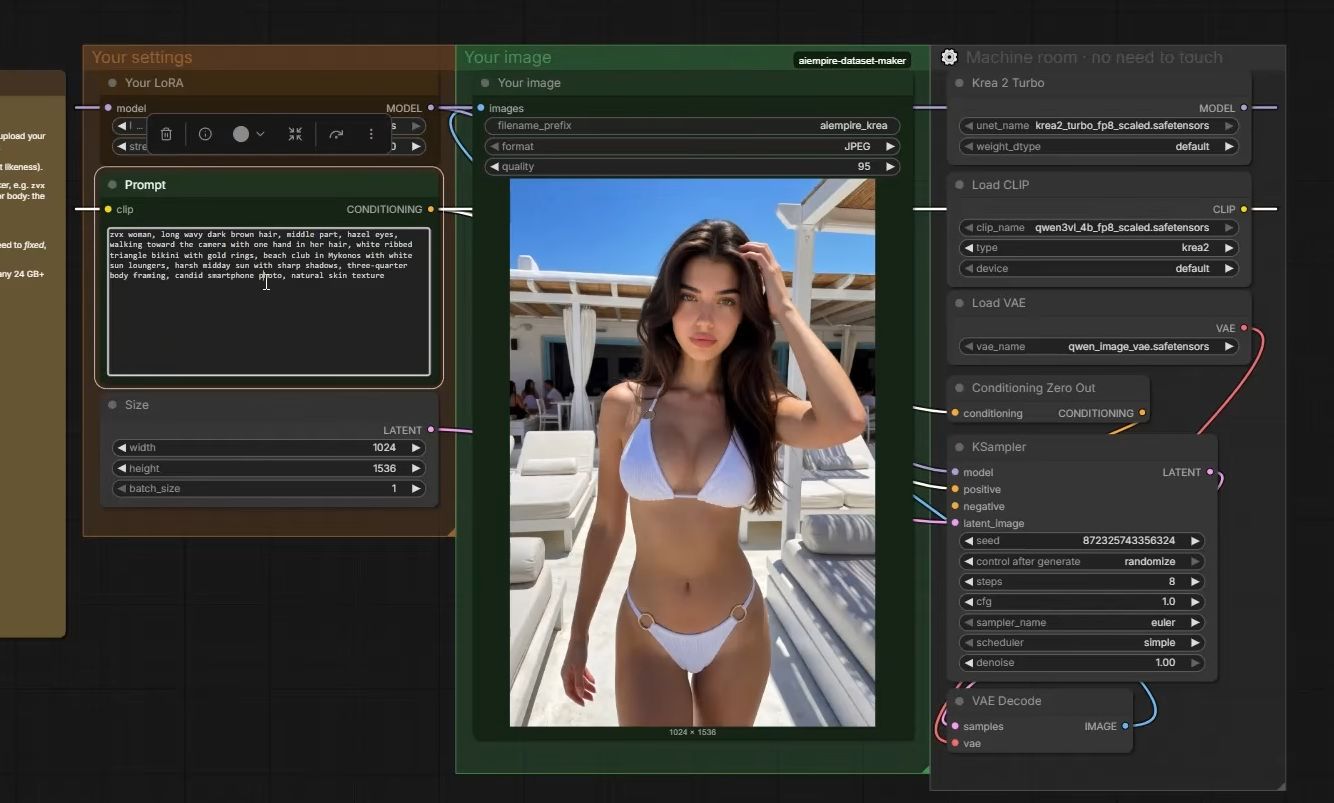
Why do trainer samples look fine but ComfyUI images look worse?
The trainer’s samples and your ComfyUI images aren’t made the same way. Samples use the trainer’s own sampling setup, and your generator uses its own steps, CFG, sampler and image size. If those don’t match what the model expects, the face can be right while the image can look soft, noisy or burnt.
The model can differ too. Our current template trains on the full version of the base model, while the generator runs its faster turbo version, so samples and posts don’t even come from the same model file.
Match the settings of the template that goes with your base model. Ours, for the current base model, are:
| Setting | Our current generator template |
|---|---|
| Steps | 8 |
| CFG | 1 |
| Sampler / scheduler | euler / simple |
| Size | 1024×1536 (square: 1280×1280) |
| LoRA strength | 0.9 (0.8 looser, 1.0 strongest) |
These are the right settings for our template on our current base model, not for every model. A different base model has different numbers. The common mistake is loading a LoRA into an old workflow built for another model, with that model’s step count and CFG still in place.
What if she looks right in close-ups but not in full body?
That’s a dataset gap, and it’s the one check that needs a retrain. The LoRA learned her face mostly from close-ups, so in full-body shots, where the face is small, it guesses. Tests catch this: if every checkpoint fails the same framing, no checkpoint will fix it.
Aim for about a third close-ups and upper body, a third cowboy and three-quarter shots, a third full body: the mix the course uses for prompts. If full body is thin, add more full-body images of her and train again. The free LoRA dataset planner lays out a shot list with that mix. How many images you need and what they should show is in our guide to LoRA dataset size.
If the face is fine but every image has the same background, outfit or expression, the LoRA works too well on the wrong things. That’s overtraining, covered in our LoRA overfitting guide.
What can go wrong?
- You change three things at once. Strength, trigger and checkpoint together, on a random seed. Something improves and you don’t know what. Fix the seed and change one thing per run.
- The pod is gone before the LoRA is saved. Terminating a RunPod pod deletes everything not on a network volume (RunPod docs, checked 2 Oct 2026). Download the
.safetensorsfiles from the trainer’s output folder first. - Two files, one name. You upload a newer checkpoint under the same file name and test the old one by mistake. Keep the step number in the file name.
- You test only one checkpoint. Early ones are close but not quite her, and the final file isn’t always the best. Video 3 of our course compares the final file, 2500 and 2000. The method is in how to test a LoRA.
- The prompt fights the LoRA. Face shape, makeup or body words in the prompt pull toward a different woman, even with a perfect LoRA. Delete them.
Questions people ask
Why does my LoRA have no effect at all?
Why doesn't my LoRA show up in ComfyUI's list?
Can I use my LoRA with a different base model?
What does 'lora key not loaded' mean in ComfyUI?
Read next
- How to test a LoRA and pick the right checkpoint
Compare the 2000, 2500 and final 3000-step files with the same prompt and seed, as video 3 of our course does. How to judge them and pick the keeper.
- How to keep your AI character's face the same in every photo
Prompts, reference images, a character LoRA, or a LoRA trained on a dataset you generate. What each holds, what it costs, and when you need a LoRA.