How do you pick and use a LoRA trigger word?
A LoRA trigger word is a made-up token plus a plain class word, like zvx woman, that the LoRA learns to link with your character. Ours is a 3-letter token plus “woman”. In the course’s setup the Dataset Maker puts it at the start of every caption, and you type it at the start of every prompt. Spell it the same everywhere and it reliably brings back a consistent AI character.
On this page
What is a LoRA trigger word?
A trigger word is the name your LoRA learns for her. During training, it sits at the start of every caption, next to images that all show the same face. The trainer ties whatever never changes in those images to that word. Later, typing it in a prompt calls her back.
This isn’t a quirk of one tool. The idea goes back to Google’s DreamBooth paper (Ruiz et al., 2022), where the model “learns to bind a unique identifier with that specific subject”, written next to the word for its class. Today’s LoRA trainers, including AI Toolkit, work on the same principle.
How do you pick a good trigger word?
Pick a short made-up token the model has never seen, and add a plain class word after it. The token has no old meaning to fight, so it can only mean her. The class word tells the model what she is, so it starts from “woman” instead of from nothing.
| Trigger | What happens |
|---|---|
zvx woman |
Made-up token plus class word. What we use, and the Dataset Maker’s default. |
zvx |
Can work, but the model gets no hint of what it is. The class word gives it a starting point. |
sofia |
A real first name already means something to the model. Those old ideas leak into her face. |
woman |
Appears in countless captions the model learned from. Nothing unique for her face to attach to. |
zvx_woman_final_v2 |
Long and easy to mistype. One wrong character in a prompt and she’s gone. |
zvx girl |
Use “woman”. Characters on this site are always clearly adult, and the trigger should say so. |
| A real person’s name | Never. We only build original characters. |
A few habits that save trouble later:
- Lowercase, one space, no commas. A comma splits it in two, and capitals are one more thing to mistype.
- Three or four letters for the token.
zvx,qmtr,vrlk: short, unusual, easy to type on a phone. - One token per character. A second character gets a new one.
- Write it down before you train, and put it in the LoRA’s file name afterwards.
The free LoRA caption checker checks the trigger word itself as well as every caption line.
Where does the trigger word go?
At the start of every caption and every prompt, spelled exactly the same. The Dataset Maker puts it at the start of every caption, which is what ties her face to it. You set up the training job yourself in AI Toolkit, and its Trigger Word field is empty by default: type the same string there too.
| Where | What you do |
|---|---|
| Dataset Maker | Type it in the trigger_word box (default zvx woman). It starts every caption it writes. |
Training captions (.txt) |
Nothing, if the Dataset Maker wrote them. Check one: it should start with the trigger. |
| AI Toolkit job (Trigger Word field) | Type the same string, letter for letter. It’s empty by default. |
| Prompts | Type it first: zvx woman, long wavy dark brown hair, middle part, hazel eyes, then the scene. |
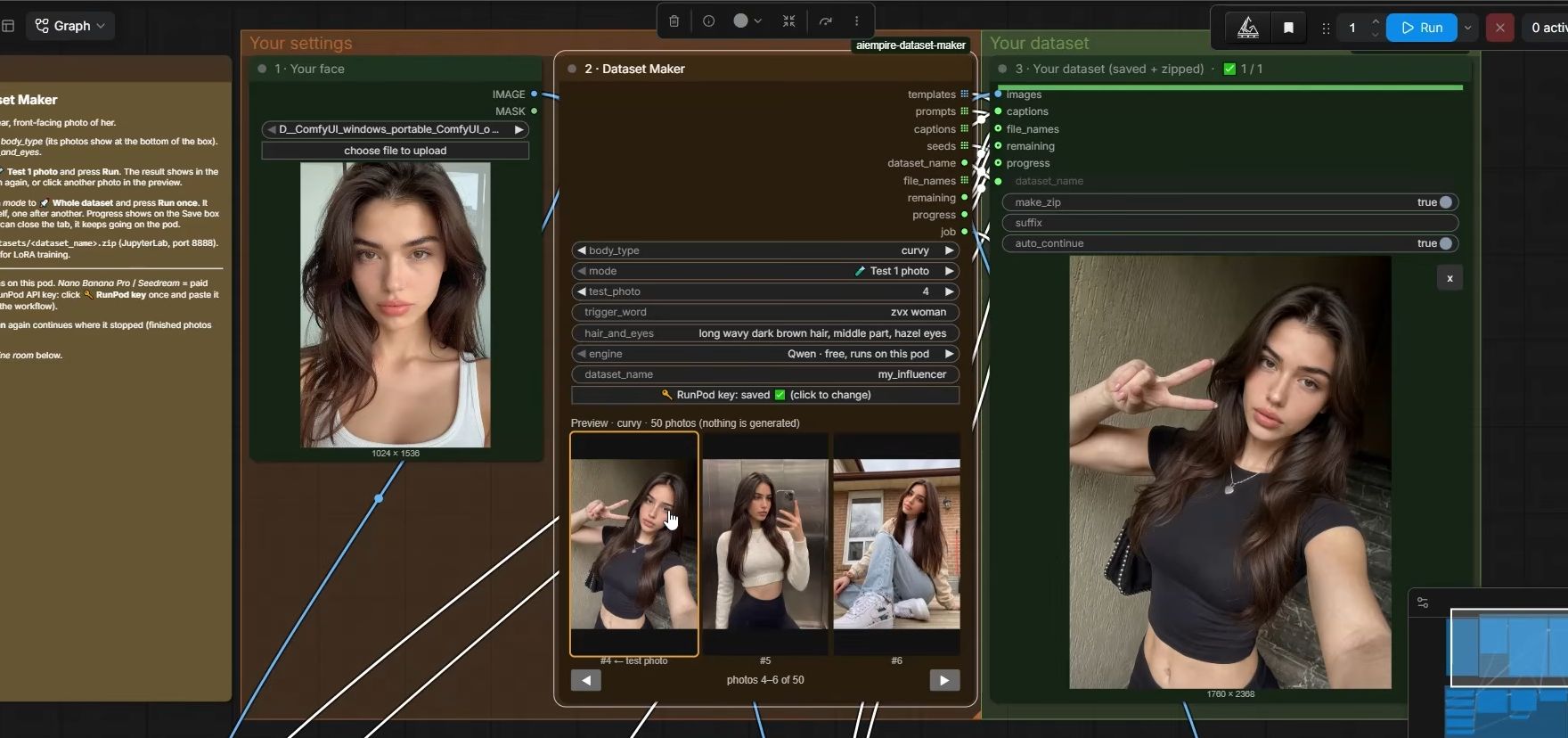
Captions carry the trigger plus only what changes: the shot and pose, outfit, place, light and framing, never her face or hair. The full rule is in our LoRA captioning guide. The free AI influencer prompt generator puts your trigger first and builds the rest of the prompt in the course format.
What does AI Toolkit do with the trigger word?
You set up the training job yourself, in AI Toolkit’s job screen. Its Trigger Word field is empty by default and fills in the same trigger_word setting the example config describes. Per that config, it’s added to any caption missing it, and a [trigger] placeholder in captions or sample prompts becomes your word.
The AI Toolkit README documents the [trigger] placeholder, and the “added to captions if it does not already exist” note is in the example YAML config (both checked 2 Oct 2026).
Two things follow from that. We haven’t tested them; this is reasoning from the documented behaviour:
- Set it to the exact string your captions use. Going by that config note, a different word in the Trigger Word field would be added to every caption as well, so each image would carry two names for her.
- Start your own sample prompts with the trigger (or
[trigger]). Without it, the samples aren’t asking for her, so they can’t show you how well she’s learned.
Can you change a LoRA’s trigger word after training?
Not really. The LoRA learned her as that exact token, so a new word in your prompt means nothing to it. If you want a different trigger, change it in every caption, then train again. That’s why it pays to pick one you’re happy with before the first run. This is how LoRA training works generally, not a course rule.
How do you find a LoRA’s trigger word later?
Open any caption file from the dataset you trained on. The trigger is the first thing in every one of them, before the first comma. Then save it somewhere you can’t lose it: in the LoRA’s file name, or a text file next to it. Guessing wrong just gives you a stranger’s face.
This matters more than it sounds once you have a few checkpoints from one run and a second character. A file named zvx-woman-2500.safetensors tells you the trigger and the checkpoint at a glance.
Why isn’t my trigger word working?
Usually the prompt’s trigger doesn’t match the captions letter for letter, or it isn’t at the start of the prompt. Check those two first, then delete any face, makeup or body words that pull the model toward someone else. If she still doesn’t show up, the problem is bigger than the trigger word.
- Copy the trigger from a caption file and paste it into the prompt.
zvxwomanandzvx womanare different strings. - Move it to the very start of the prompt.
- Delete face, makeup, skin and body words. Keep only the short hair-and-eyes line after the trigger.
Still not her? LoRA strength, the base model and the checkpoint come next. Our LoRA not working guide goes through them in order.
What can go wrong?
- A real word as the trigger. The model’s old idea of that word blends into her face. Use a made-up token.
- A typo in the prompt. One missing space and you get a generic woman. Copy and paste the trigger from a caption file.
- Hair or face words in captions. They become changeable, and her hair or eye colour drifts. Strip them out.
- A different word in the job’s Trigger Word field. Make it match the captions exactly, letter for letter.
- The same trigger for two characters. You can’t tell the LoRAs apart in prompts or notes. One token per character.
- A lost trigger. Months later nobody remembers it. Put it in the LoRA’s file name.
Questions people ask
Does a LoRA need a trigger word?
Should the trigger word be a real name?
Does the trigger word have to go first in the prompt?
Can two of my LoRAs share a trigger word?
How do I find the trigger word of a LoRA I trained months ago?
Read next
- LoRA not working? 7 checks, cheapest first
LoRA doing nothing, giving the wrong face or not loading in ComfyUI? Seven checks, cheapest first, from the file to the dataset.
- How many images do you need to train a character LoRA?
A character LoRA needs 20 to 50 images. We train on 50. What they should show, how to caption them, how to pick a trigger word, and what goes wrong.
- How to keep your AI character's face the same in every photo
Prompts, reference images, a character LoRA, or a LoRA trained on a dataset you generate. What each holds, what it costs, and when you need a LoRA.